Features
Everything you need to streamline your workflow
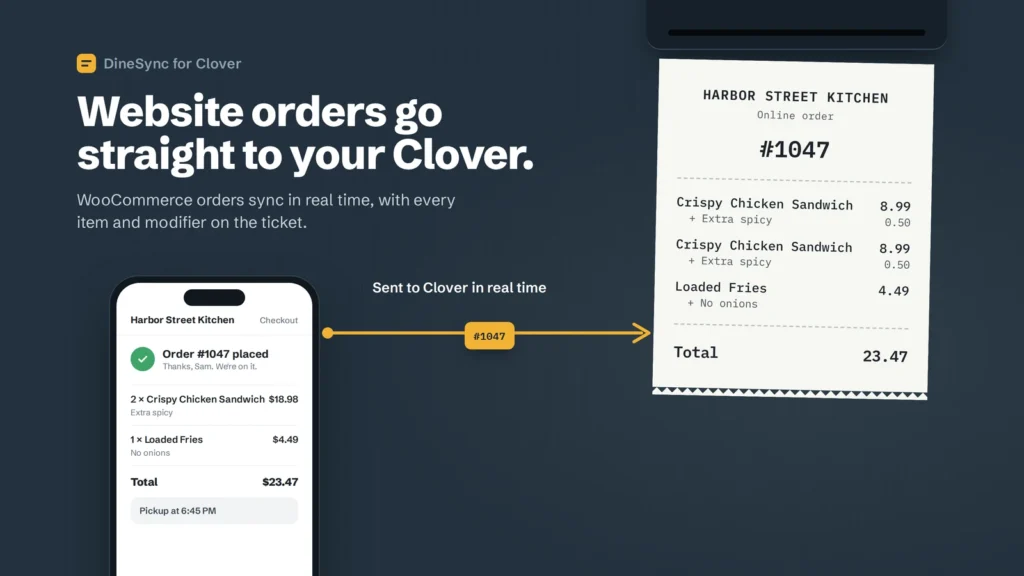
Orders Reach Your Register in Real Tim
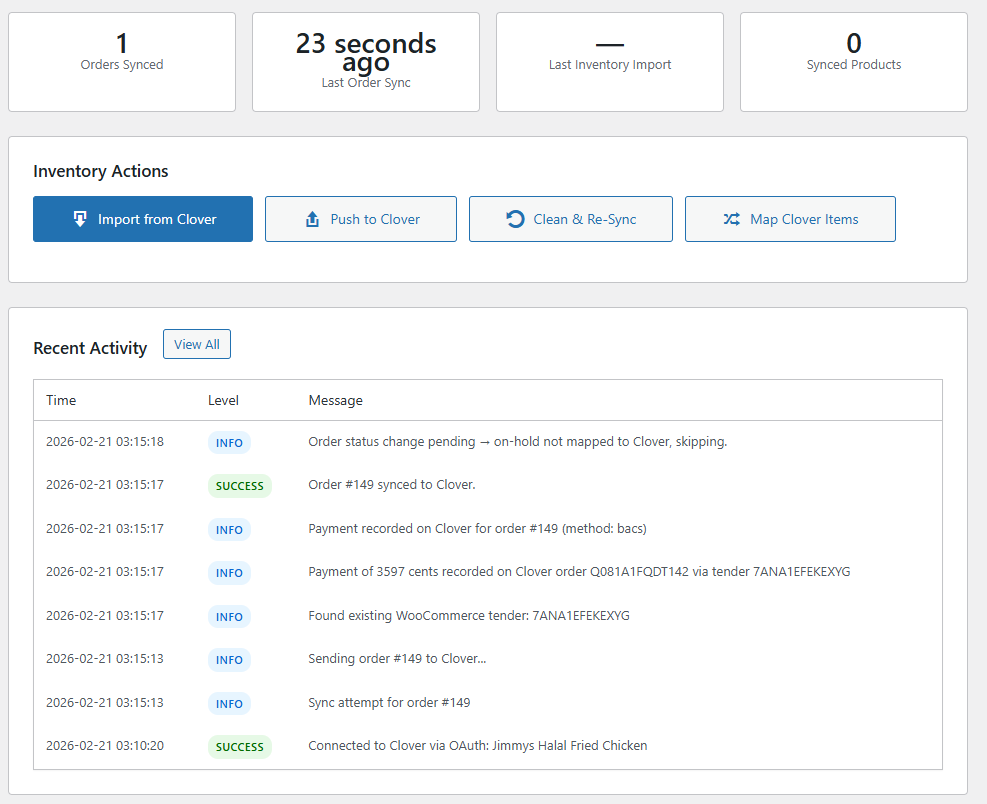
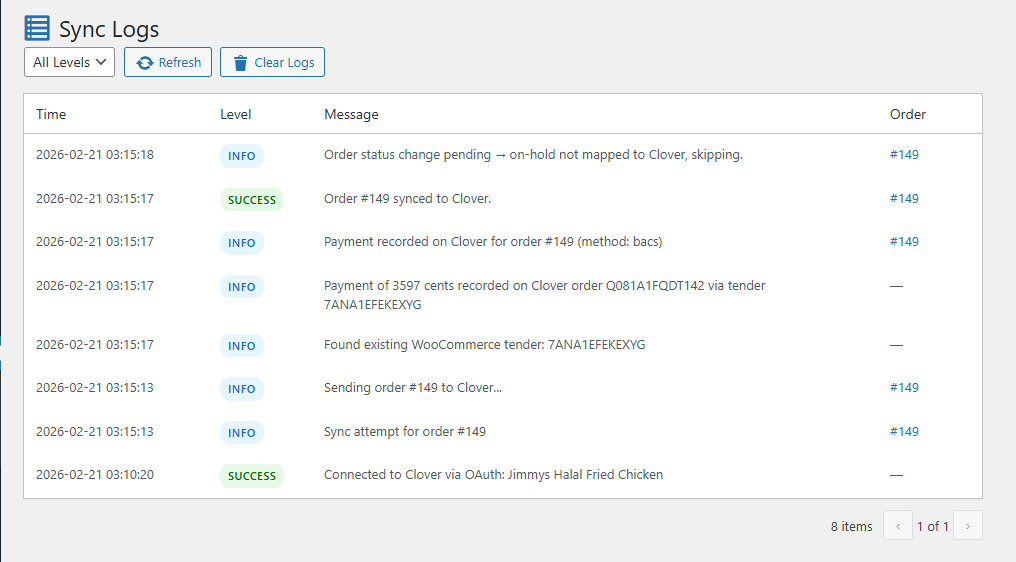
Every website order lands on your Clover within seconds of checkout — line items, modifier selections, customer details, fees and discounts, with the payment recorded so it shows as paid.
Auto-Print to Your Kitchen Printer
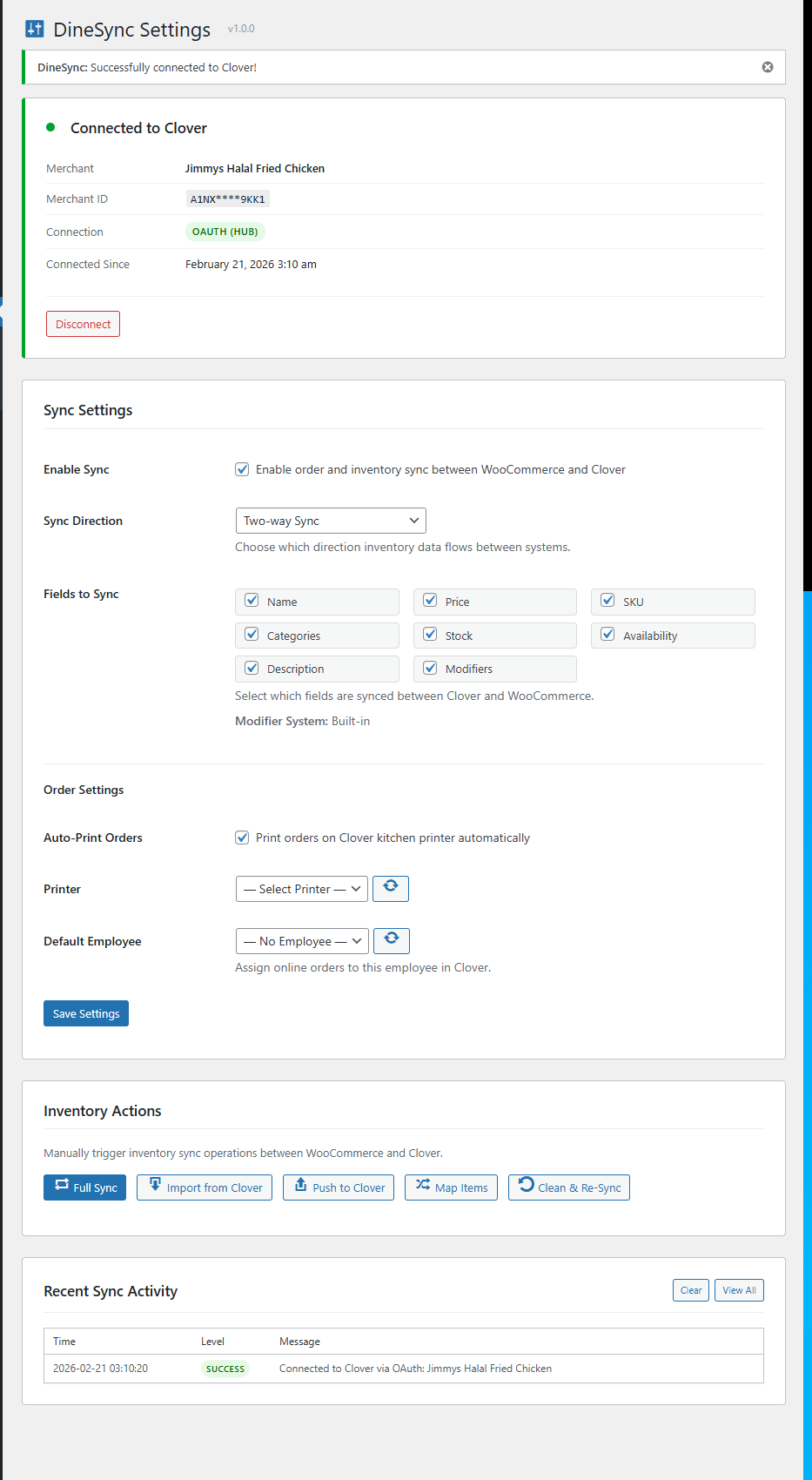
Orders print to the Clover printer you choose the moment they come in. Assign online orders to a Clover employee so they show up correctly in your reports.
Import Your Clover Menu
Bring items, prices, categories and modifier groups into WooCommerce in one click. Existing products are matched by SKU or name, so nothing gets duplicated.
Push Product Changes to Clover
Save a product in WooCommerce and only the fields you changed go to Clover. New products are created there automatically, with their categories.
Modifiers That Work on Your Storefront
Clover modifier groups become real options on the product page — sizes, toppings, extras — with prices that update as the customer chooses. Works with WooFood, WooCommerce Product Add-Ons, or the built-in renderer.
No Commission, No Lock-In
Your store stays yours. No per-order cut, no separate ordering system, no data held hostage. Remove the plugin and WooCommerce is exactly as it was.
Order Status Follows Through
Mark an order Completed in WooCommerce and it becomes Fulfilled on Clover; Cancelled and Refunded become Cancelled.
Requirements
Make sure your server meets these requirements before installing.
Screenshots
See the plugin in action
Frequently Asked Questions
Common questions about this plugin
Most Clover plugins replace WooCommerce with a custom ordering system — their own cart, checkout, and database. DineSync works WITH WooCommerce. Your products, orders, and customers stay in WooCommerce, so you keep access to 800+ payment gateways, shipping plugins, and marketing tools. DineSync is also the only plugin offering true two-way sync.
Yes — DineSync is the only WordPress plugin that supports pushing WooCommerce products to Clover POS
Yes — with your next menu import. Import your Clover menu on demand with the free version, or let DineSync Pro import it automatically every 5 to 60 minutes. DineSync connects to Clover with your Merchant ID and API token only — no webhooks, no middleman — so in-store sales reach WooCommerce with the next import.
DineSync automatically creates a matching WooCommerce product with the correct name, price, SKU, stock level, and category assignments. No manual data entry needed. The same works in reverse — new WooCommerce products are created on Clover automatically.
Yes — new items and edits you make on Clover come into WooCommerce with your next menu import (on demand, or automatically every 5 to 60 minutes with Pro). Changes you make in WooCommerce are pushed to Clover immediately when you save. Order status changes go from WooCommerce to Clover in real time; a void or refund made directly on the Clover device is not picked up automatically.
A WooCommerce order is claimed before it is sent, so a page refresh or an ordinary retry won't send it twice. If sending fails, the reason is stored on the order and you retry it yourself, or from the alerts screen with Pro. If Clover accepts an order but the reply is lost, a retry can create a second order on Clover — so check Clover before retrying one that timed out.
DineSync includes a built-in modifier renderer that works out of the box. It also has adapters for WooFood / Flavor and WC Product Add-Ons. The plugin automatically detects which system is active and writes modifiers in the correct format.
All your WooCommerce products, orders, and customer data remain exactly as they are. There is no proprietary database or vendor lock-in. You can also use Clean & Re-Sync to reset all mappings without losing products or orders.
No. DineSync sends an order to Clover when it has actually been paid, not when the customer reaches the checkout page. A declined card never reaches your kitchen, and an order needing 3-D Secure arrives only after the customer authenticates.
Those reach your kitchen as soon as you accept the order, because you need to cook them — but Clover is not told a payment arrived, since it hasn't. Your till shows the ticket and the money side stays honest.
No. DineSync never handles card details — your payment gateway does. What it sends Clover is a record that the order was paid elsewhere, using a "WooCommerce" tender, with no card transaction attached. One thing worth telling your staff: an online ticket is already paid, so ringing it up again on the Clover device would be a real second charge.
The order will still show as Synced, but DineSync will not warn you that an item wasn't linked — so the safest habit is to link every product you sell. The Products list shows "Not linked" wherever a link is missing; use Map Clover Items or Choose to link them before they can be ordered.
DineSync matches items by SKU or name, so identical items won't duplicate. But if a Clover item's name differs from your WooCommerce product's name — for example "Wings 10 pcs" versus "Wings 10pcs" — it will come in as a new product. Review the Products list after an import and trash or link any duplicates.
They're sent to Clover the moment you accept them, with no payment recorded — the customer pays at the counter. Clover counts the stock when the payment is taken there, so DineSync sends nothing for stock on these orders.
The Clover order is marked cancelled, and DineSync puts the stock back on Clover — once, and only the units Clover actually counted. An order that was never paid on Clover gets nothing put back, because Clover never took anything off. A refund restores stock only if you tick "Restock refunded items" when refunding.
It's marked Failed, with the reason stored on the order — a lost reply or an unreachable Clover won't fail silently. Retry it yourself from the order; with DineSync Pro you also get an email alert and can retry from the failed-orders screen.
No. You connect DineSync with your Clover Merchant ID and API token — that's it. There is no App Market install, no one-click connect, and no middleman server.
Changelog
Version history and updates
Stock on your Clover POS:
- Fixed: a website sale of an item tracked on both sides came off your Clover count twice. DineSync now sends nothing to Clover for a sale, because Clover takes each linked item off its own count when the order is paid there, online at checkout or at the counter for a cash order.
- New: canceling an order, or refunding it with “Restock refunded items”, puts its stock back on Clover, once, and only the units Clover actually counted. An order Clover never took a payment for has nothing put back, because Clover never took it off.
- New: a Failed or trashed order has its stock put back the same way, and a canceled order you move back to Processing has those units taken off Clover again.
- New: moving a paid order to Pending payment to edit it changes nothing on Clover. Clover is settled only if the order is then canceled or fails.
- New: the order’s DineSync panel has a Stock line saying what was put back, why nothing was, or what to correct by hand. If DineSync cannot tell whether Clover counted the order, or Clover’s count changed while stock was being put back, it writes nothing and says so there.
- Fixed: a dish with portions left could be sent to your till as zero, and then stop syncing altogether. WooCommerce marks a product out of stock at any quantity at or below your Out of stock threshold, and DineSync read that as “none left”; your real count is sent now, right down to zero.
- Fixed: a product sold out at zero could leave its old count on your till. It now sends 0, while a dish on backorder keeps its count.
- Fixed: a product that tracks stock, whose Clover item did not, was never synced at all. The first save now starts the stock record on Clover at your quantity and names it in the sync log.
- Fixed: after Map Clover Items or Choose, the first stock change wrote WooCommerce’s whole count over your till’s, so with 3 on your till and 50 in WooCommerce, one website order sent 49. A product that was not tracking stock when it was linked also ignored every later change.
- Changed: after Map or Choose, each stock change you make is applied to the count your till already holds, until the two counts agree. If it cannot read your till it sends nothing and says so.
- Changed: the sync log says what a stock change moved and where your till ended, where it used to say “+0”. A sale’s line says it moved with the order and that nothing was sent.
- Fixed: saving a product that tracks stock sent a request to Clover every time, through a field Clover treats as out of date. Stock now has its own update, sent only when the Stock toggle is on and the count has changed.
Known limits for stock:
- A void or refund made on your Clover device is not seen by DineSync, and Clover does not restock for it either, so correct both counts by hand.
- Items that reached Clover without their link, items added with Send missing items, and order lines you edit after the order reached Clover are not counted or put back by DineSync. Correct those counts on Clover by hand.
- Changing a product’s stock in WooCommerce sends your number to Clover over any in-store sales since your last import. That includes a cash order still waiting to be paid at the counter, which leaves Clover one short once it is paid.
- Product variations are not linked to Clover, so their stock is never changed there.
- If Clover cannot be read, or refuses a put-back, it is tried again only when that order’s stock or status next changes. Otherwise the order’s panel tells you to correct the count by hand.
Your orders:
- Fixed: when Clover’s reply to a new order was lost, a retry could put a second copy of the order on your till. Every Clover order now carries a reference, and a retry looks for it and uses the order Clover already has.
- Fixed: two requests arriving at once could both send the same order, and a crash part-way through a send left the order stuck with no Retry button. Only one send can run now, and an order stuck for five minutes is marked Failed with a note to check Clover before sending it again.
- Fixed: an order Clover already holds could be sent again by a status change or a retry. It never is now, and Sync to Clover on such an order says so, pointing a partly synced order at Send missing items.
- Fixed: an order Clover could not fire to the kitchen was still marked Synced. It is now marked Failed, with a note to fire it in Clover, and no payment is recorded.
- Fixed: an order where no food reached Clover was still fired and paid. It is now marked Failed, and the order says nothing reached the kitchen.
- Fixed: a canceled, refunded, failed or trashed order could still be sent by a retry. It never is now, and the order says why.
- Fixed: the Clover ticket said “Paid via” even for an order that was not paid yet. It now says “To pay” until the payment is taken online, and “Refunded” after a full refund.
- New: an order with no payment method, such as one you enter yourself, is sent once it is On hold, Processing or Completed, with no payment recorded on Clover.
- Changed: editing the lines of an order that already reached Clover does not change the Clover ticket, and the order’s panel now tells you to update it there by hand. An order canceled on Clover and then reopened in WooCommerce is not reopened on Clover, and says so.
- Fixed: a paid modifier canceled a product’s sale price, so a dish on sale at 8.00 with a 2.00 extra charged 12.00 instead of 10.00. The extra is now added to the price the customer is actually charged, on your storefront and on the Clover line.
- Fixed: a discount entered on the order rather than by coupon reached Clover at full price, so the ticket came to more than the sale. A discount now reaches Clover as a discount on the order, named after the coupon where there is one, so the receipt and Clover’s reports match what the customer paid.
- Fixed: on a discounted order where part of it had not reached Clover, Send missing items sent the food without its discount and the order was marked Synced anyway. The repair now sends the discount with the food, and an order is not marked Synced while any line is still missing.
- Fixed: a paid order’s Clover receipt showed no order reference. The payment now carries the same reference as its Clover order.
- Fixed: emoji and other characters Clover cannot print came out as “?” on the ticket, and line breaks in a note ran words together. Accented letters are converted rather than dropped, so “Café Latte” stays readable, and a name in a script Clover cannot print is kept rather than sent blank.
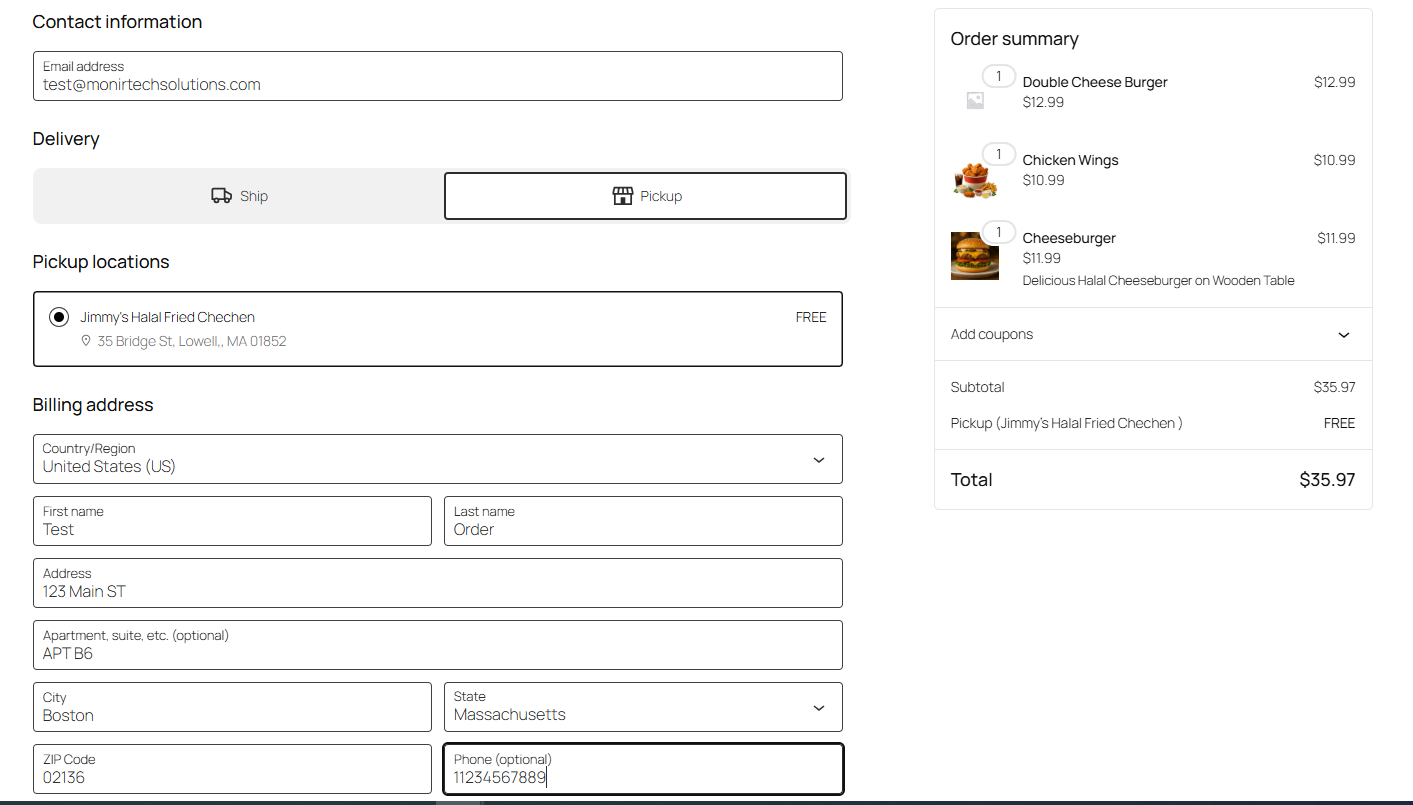
- Fixed: the note sent to Clover did not say whether an order was a Pickup or a Delivery on an ordinary WooCommerce shop. It now works that out from the shipping method, including the block checkout’s pickup, and shows the customer’s address only on a delivery.
- Changed: each line’s price is checked against what Clover recorded. A line Clover will not price as sent is sent again in a form Clover always accepts, and where Clover accepts a different price the log names both prices.
- Fixed: an order waiting for payment was logged as though it had failed, sometimes several times for one checkout. Only a refusal that will not clear on its own is logged now, with statuses named the way WooCommerce names them.
- Changed: the sync log no longer keeps Clover’s copy of an order, with the customer’s name, phone and address, each time the order’s status changes.
Your Clover links:
- Fixed: importing or mapping could move a product’s Clover link to a different item, and a name matching more than one item was settled by guessing. A link is never moved automatically now, and a clash is left alone and named in the sync log.
- Fixed: a push whose reply did not name the Clover item erased the product’s link, and Clear item mappings left behind the record of what Clover last held. A link is now written only when Clover names the item, and clearing links clears that record with it.
- Fixed: a Clover item could be linked to a product variation, which was then renamed and repriced while nothing could show or remove the link. Only products are matched now.
- Fixed: an import renamed and repriced a product before checking whether that Clover item already belonged to a different product. It checks first now and leaves the product alone.
- Fixed: editing a product that was not linked to Clover created a new item there, and one save could push a product more than once. Saving now updates only an item the product is already linked to, once; new items are created only by Push to Clover or Full Sync.
- Fixed: a product in the Trash was not always recognized, so importing could bring it back as a new published product. Matching now compares titles exactly, and works after Clean & Re-Sync has cleared every link.
- New: a Clover link column on the Products list shows each product’s Clover item or “Not linked”. Choose picks the right item when a name matches more than one, and Unlink clears a link without touching Clover.
Your categories:
- Fixed: every import renamed your product categories to Clover’s names and changed their web addresses, so a category you had renamed went back and links to it broke. Names change only when they genuinely differ, web addresses are left alone, and a rename is logged with both names.
- Fixed: a category name containing “&” or an apostrophe was renamed on every import and could be created a second time on Clover. Both sides now compare the name as you typed it.
- Fixed: if DineSync could not read your Clover categories it created a second category with a name you already had. It now leaves categories alone for that run and says why.
- Fixed: a push could remove category assignments on your Clover POS that DineSync never made, such as a kitchen-printer group. Only assignments DineSync added are ever removed.
- Fixed: saving a product could send its categories to Clover when only its stock had changed. Categories are sent only when you change them, including on the first save after Map or Choose, and the log names each one added or removed.
Your settings:
- Changed: Fields to Sync is now called Fields pushed to Clover, because that is what it governs. An import writes what Clover holds whichever boxes are ticked, except Stock and Modifiers, and the screen now says so.
- Fixed: Enable Sync and Sync Direction did not hold, so with direction set to WooCommerce to Clover only, automatic syncing still pulled your Clover menu over your shop. Both settings now govern everything that runs on its own, while the buttons under Inventory Actions say first when a setting points the other way.
On your screens:
- Fixed: names coming from your Clover POS could run web code in your browser on Sync Logs and Settings. Everything from Clover is now shown as plain text.
- Changed: the hosted “connect with one click” option has been removed, with the middleware behind it; it needed a Clover app that was never published, so no store used it. Connections made with a Merchant ID and API token are untouched, and DineSync now contacts nothing but Clover itself.
- Changed: every inventory action now asks before it runs, and says what it adds and where. Clean & Re-Sync is marked as the one that destroys something, and its confirmation names the product fields its re-import will overwrite.
- Fixed: Clean & Re-Sync cleared every link before reading Clover, so a busy or unreachable Clover left your shop with no links at all. It now reads Clover first and changes nothing if it cannot.
- Fixed: Full Sync reported success even when its push step had failed. It now says which step stopped and what did finish.
- Fixed: the Products list’s Send action said a product had been sent to Clover when nothing was sent. It now says what actually happened and points at Push to Clover.
- Changed: the push summary and the list of products Map could not link now appear on screen as well as in the sync log. The push summary also counts the whole run, not only the last batch of thirty.
- Changed: the stock repair notice also counts damaged products that are not linked to Clover, and points you at Map Clover Items. Those are reported rather than repaired, because without a link there is no way to ask Clover what they should hold.
- Changed: notices about your product links appear only on DineSync’s screens, the Products list and the product editor.
- Fixed: after an update, your admin screens could keep the previous version’s stylesheet and script until you emptied your browser cache. They now change when the files do.
- Changed: Synced Products on the Dashboard no longer counts products in the Trash, and every screen and log line now says Clover, or your Clover POS.
- New: a description of DineSync Pro on the Dashboard, under Inventory Actions. It can be dismissed, appears on DineSync’s own screens only, and is absent when Pro is installed.
- Fixed: importing your Clover menu could create a second copy of a product you had put in the Trash. The import only ever looked at products that were on your shop, so anything in the Trash was invisible to it — the till item looked new, a fresh product was made, and you ended up with two products claiming the same till item. The import now recognises a trashed product and leaves the item alone, saying so in the sync log and naming the product. Nothing is taken out of the Trash: if you want one back on your menu, restore it yourself and import again.
- Fixed: the Clean & Re-Sync confirmation only told you what it was about to remove. It now says how many products’ Clover links will be cleared, and that your products, orders and customers are not affected and nothing is sent to Clover — which is the half you actually need before pressing it.
- For developers: the automatic push that runs when a product is saved now asks the
dinesync_should_push_productfilter first, as the bulk push already did. It is also told whether it is answering a save or a bulk push. This is what lets DineSync for Clover Pro stop a product that is still waiting for review in Menu Staging from reaching your till when you open it in the product editor and save it.
- Sync log entries that count something now say how many were attempted as well as how many succeeded — “cleared 2 of 2” rather than “cleared 2”. A bare count gives you nothing to check it against.
- Tested with WooCommerce 11.1.
- For developers: a new
dinesync_should_import_itemfilter lets other code keep a Clover item out of an import. DineSync for Clover Pro uses it in Menu Staging so that a till item linked to a product you have put in your bin is left alone instead of being brought in again as a second copy. On the free plugin by itself, importing such an item still creates a new product — the filter is the hook that makes leaving it alone possible, not a change to what the free import does on its own.
The full history of every version is in changelog.txt.